
ProOps Ads Tracker: Your automated daily coordinator for Google Ad Manager (GAM).
Powered by Ads Tracker HQ.
ProOps Ads Tracker is a daily Google Ad Manager monitoring tool for publisher ad ops. Each morning Ads Tracker HQ pulls your GAM reporting data through yesterday, compares campaigns, revenue, and inventory to rolling baselines, and delivers a prioritized briefing in a Chrome sidepanel beside GAM by 8 AM local time - 7 days a week. Read-only service account. 30-day free trial on your own network; no credit card to start.
Daily Google Ad Manager monitoring, already done by 8 AM
Three buckets. One briefing. Read before 8am - so your ad ops team can focus on yield and optimizations, not running reports.
Under-delivery, flagged on day 1
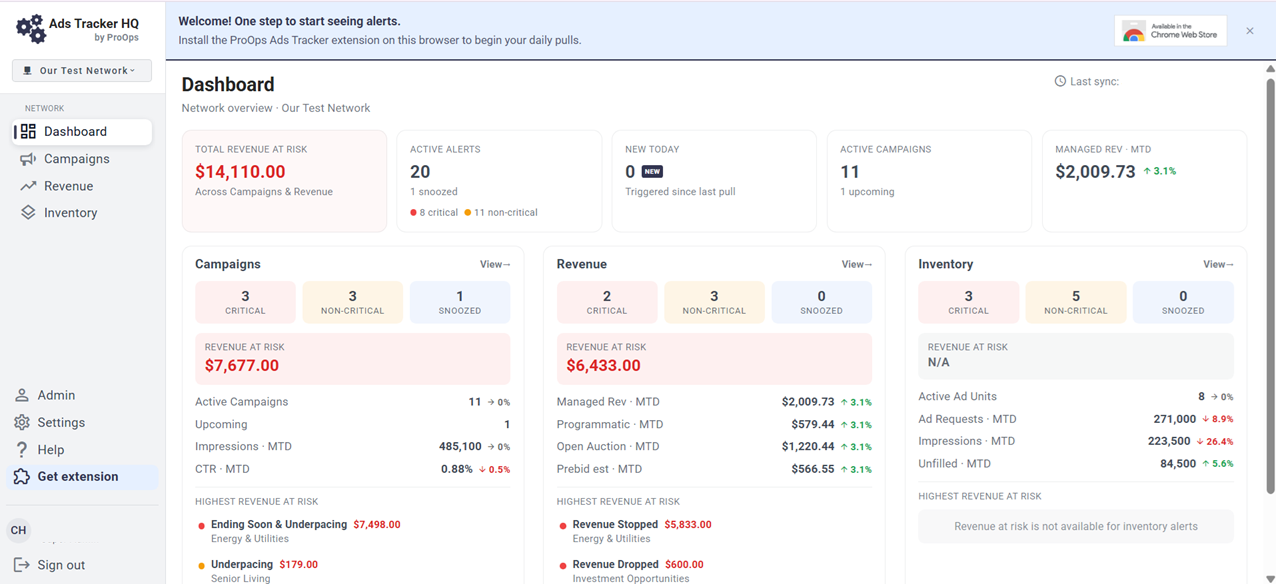
Direct-sold orders in Google Ad Manager: ending soon and underpacing, no delivery, and pacing shortfalls. Flagged in the morning briefing - not the Tuesday afternoon a weekly review would have caught them.
Estimated 4-6 hours saved per person per week vs a manual morning check.
eCPM and deal drops, flagged on day 1
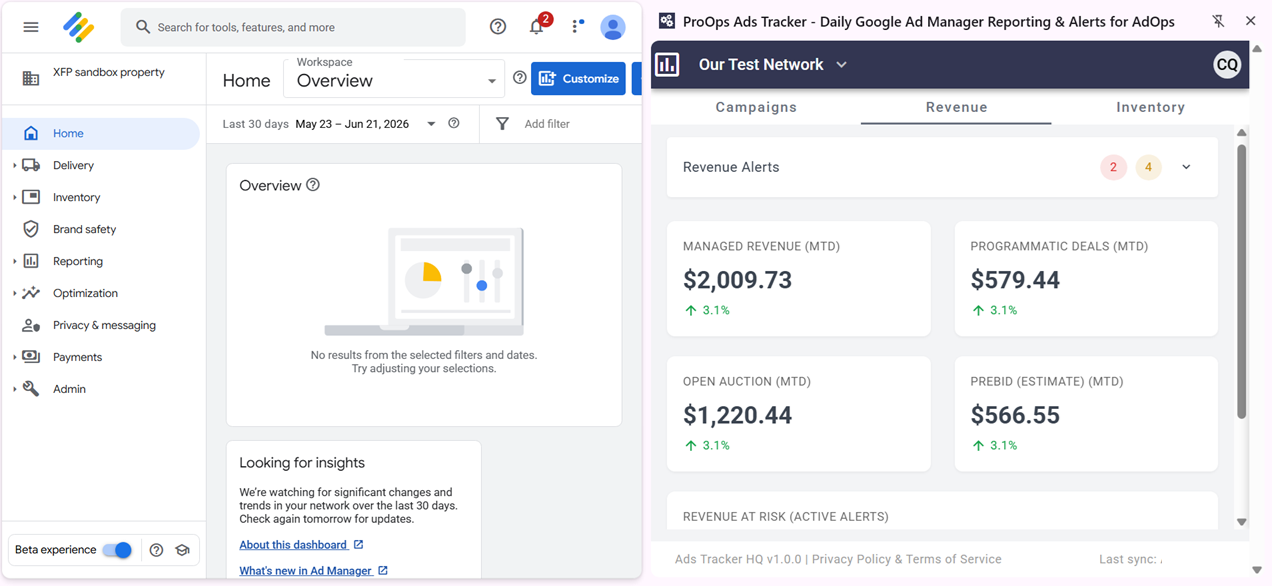
Managed, programmatic, open auction, and Prebid revenue in one view. Alerts for revenue stopped and revenue dropped, so yield issues surface before they become a month-end surprise.
Flagged in the morning briefing - not days later.
Ad-unit anomalies, flagged on day 1
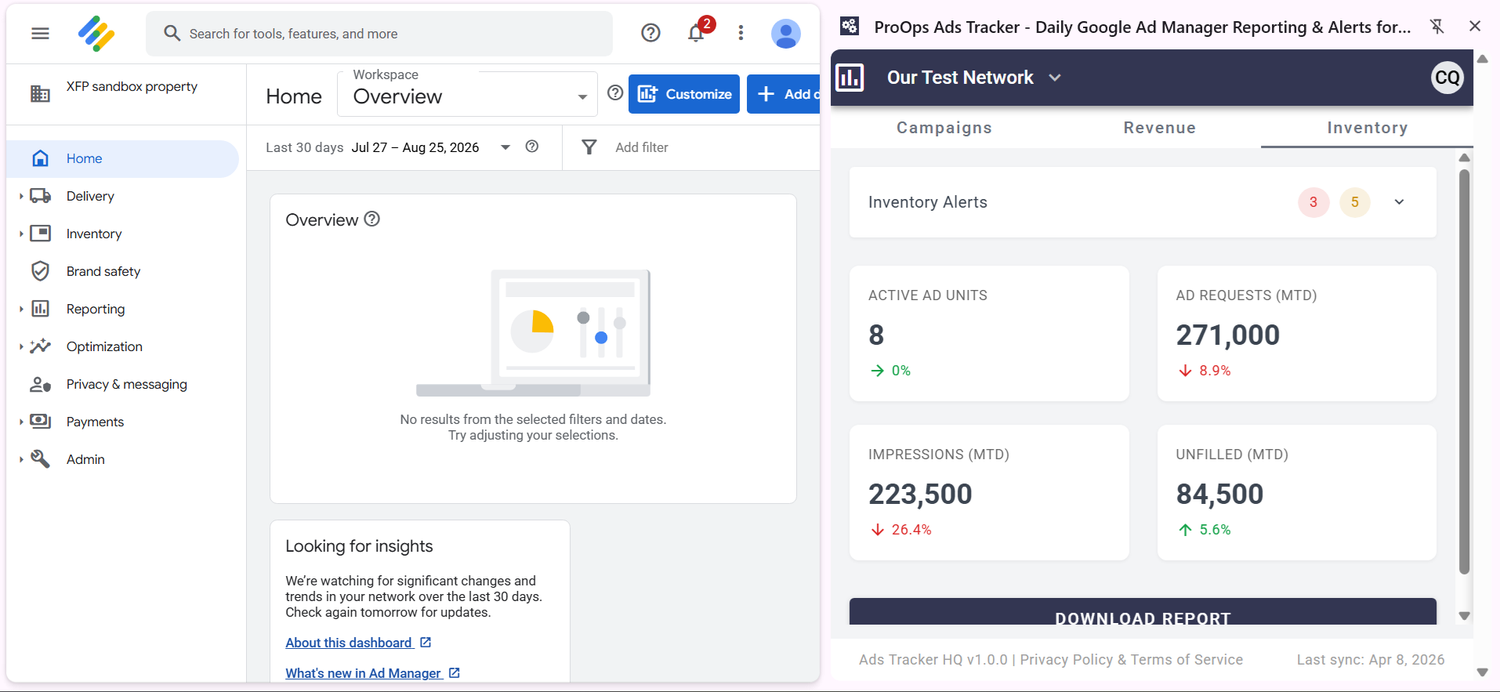
No ad requests, no delivered impressions, and fill-rate drops - plus the opt-in Troubleshoot Assistant, which analyzes the reporting behind a flagged alert and surfaces likely root causes with next steps.
Estimated 1-2 hours saved per alert investigation versus a manual hunt.
The Chrome extension is what you see every morning, beside GAM. Ads Tracker HQ is what makes it possible. Built for teams running direct-sold and programmatic in the same network.
Typical labor savings of about $1,400-$2,200/month for a 3-person team - see the math in our 2026 ROI Calculator.
No credit card. 30-day free trial on your own GAM network. Daily sync pauses on day 7 until a payment method is added.
What Google Ad Manager alerts look like every morning
Your Google Ad Manager morning briefing - campaigns, revenue, and inventory, red and orange, beside GAM.

Native GAM reports vs daily Ads Tracker monitoring
Google Ad Manager stays the system of record. Ads Tracker is the daily coordinator on top of it.
| The job | Native Google Ad Manager | ProOps Ads Tracker |
|---|---|---|
| Morning check | You build and run reports in Interactive Reports. | Prioritized briefing by 8 AM - campaigns, revenue, and inventory already ranked. |
| Ask Ad Manager | Chat when you ask. Silent if you do not open it. | Ranked briefing whether you ask or not. |
| What gets flagged | Nothing, unless someone looks. Saved reports do not compare against rolling baselines. | Red and orange alerts vs rolling baselines - underpacing, revenue dropped, no ad requests, and more. |
| When you see an issue | Whenever someone runs the report - often mid-week, sometimes month-end. | Flagged on day 1. Morning sync uses GAM reporting data through yesterday. |
| Weekends and coverage | Only if someone is in and pulls the numbers. | Runs 7 days a week, whether anyone logs in or not. |
| Access | Full GAM - the same permissions you use to traffic and edit. | Read-only service account you approve. Can monitor everything and change nothing. |
| What the team gets | Saved or scheduled reports you have to maintain as the network changes. | Ads Tracker HQ, Chrome Extension Sidepanel beside GAM, plus downloadable Excel for stakeholders. |
GAM does the serving and the source data. Ads Tracker does the daily check so your ad ops team can focus on yield and optimization, not running reports.
Also useful: best GAM monitoring tools in 2026 · what a monitoring tool should do · automate reporting without a data team.
Built by ad ops, for Google Ad Manager teams
Built by Chris Quinn, co-founder of ProOps Consulting (Toronto, founded 2024), after 19+ years in ad operations. Read-only GAM access. Live on the Chrome Web Store.
Install straight from Google's official store, then add our read-only service account. No procurement saga and no custom integration work, so setup is quick. Your briefing arrives every morning with yesterday's complete GAM delivery data.
You create the role and approve the exact permissions yourself. ProOps Ads Tracker can read your campaigns, revenue, and inventory, but it can never edit a line item, change a setting, or touch billing.
A publisher caught a direct-sold under-delivery worth $8,500 on the second day of their trial - more than a month's subscription recovered from a single Google Ad Manager alert.
Three steps to fully automated GAM monitoring
No code. No developers. No ongoing effort. Set it up once and your daily briefing arrives automatically every morning, 7 days a week.
Sign up in Ads Tracker HQ
Create your account - no credit card. Then optionally add Advertiser IDs you want left out of daily alerts: House advertisers, Prebid partner IDs, anything you don't need flagged. Your briefing covers what matters to your team, and nothing else.
Add the read-only service account in GAM
In your GAM network, create a read-only role using the exact permission list provided in the HQ onboarding steps, then add the service account HQ gives you. That is the only connection, and it can monitor everything and change nothing.
Install the Chrome extension
Download the extension from the Chrome Web Store and open the sidepanel next to your GAM session. From that point on it runs on its own: fresh data pulled every morning through yesterday, alerts prioritized, briefing ready before 8 AM.
That is the whole setup
No engineering tickets, no tag changes, no ad server configuration. Once the service account is connected, the routine runs automatically every morning, including weekends - whether anyone on your team logs in or not. See also how to automate GAM reporting without a data team.
One coordinator. Three users included. $249/month.
Transparent. Month-to-month. 30-day free trial. No credit card to start.
ProOps Ads Tracker
- ✓Your daily Google Ad Manager coordinator, powered by Ads Tracker HQ
- ✓1 Google Ad Manager Network ID
- ✓Up to 3 authorized users on your team
- ✓Daily alerts across campaigns, revenue & inventory
- ✓Downloadable Excel reports for stakeholder distribution
- ✓Opt-in Troubleshoot Assistant for AI root-cause analysis
- ✓Secure read-only GAM service account integration
Frequently Asked Questions
-
A coordinator in an ad ops context isn't the senior person making strategic decisions - they're the person who handles the daily routine that keeps the team aligned. ProOps Ads Tracker fills that role: pulling GAM data, flagging anomalies, and producing reports every morning before your team logs in. The senior ad ops staff starts the day with the routine work already done.
-
Ads Tracker HQ is the platform that powers the coordinator role. It includes self-managed alert filters, VAST-specific alerts for video inventory, multi-network support for teams managing more than one GAM ID, and the underlying data infrastructure that runs your daily monitoring. The Chrome extension is one of the interfaces to Ads Tracker HQ; the platform is the broader product.
-
In two places. Ads Tracker HQ is the dashboard. The Chrome extension is the morning briefing in a sidepanel beside your Google Ad Manager session. Both show the same ranked campaigns, revenue, and inventory alerts. Your briefing arrives every morning with yesterday's complete GAM delivery data.
-
No. The Chrome extension is one delivery interface - your morning briefing in a sidepanel next to GAM. The broader product is Ads Tracker HQ, which handles the data pulls, baseline comparison, alert generation, and reporting infrastructure. Think of the Chrome extension as how you see the coordinator's work; Ads Tracker HQ is what makes the work possible.
-
USD $249 per month per Google Ad Manager network, including 3 users. Extra users are USD $49 per month each. Every account starts with a 30-day free trial at hq.proopsadstracker.com. No credit card to start. Daily sync pauses on day 7 until a payment method is added. There is no Starter tier and no separate Enterprise list price.
-
Yes. ProOps provides a dedicated service account and the exact list of read-only permissions it requires. In your own Google Ad Manager network, you use that list to create a read-only role and add the service account under it - so you can review every permission before enabling it and confirm the coordinator can change nothing: no campaign edits, no inventory changes, no billing access. All data processing happens on Google Cloud infrastructure. Most security teams approve the integration in a single review cycle.
-
We support multi-network publishers with custom pricing (often bundled discounts). Each GAM network ID is treated separately for accurate reporting and alerts. Contact us for a tailored quote.
-
No problem. The standard subscription includes up to 3 users per GAM network. Additional users are $49 USD/month each. No cap on number of additional users. Custom pricing available for large teams.
-
Yes - subscriptions are month-to-month after the 30-day free trial. Cancel anytime with written notice; we'll stop billing immediately and remove access at the end of your current cycle. No long-term contracts or penalties.
-
Your 30-day trial is fully featured. You can start it without a credit card, though your daily sync pauses on day 7 if no payment method has been added - nothing is deleted, and it resumes as soon as you add one. At the end of the 30 days, the standard USD $249/month subscription per GAM network begins unless you cancel. We'll send a reminder beforehand, and you can export any reports at any point.
-
Daily color-coded alerts (red for critical, orange for warning) across three categories:
Campaigns: Looks at direct-sold orders, with alerts for Ending soon & underpacing, No delivery, and more.
Revenue: A mix of direct-sold and programmatic deals, with alerts for Revenue stopped, Revenue dropped, and more.
Inventory: The ad units reports and metadata, with alerts for No ad requests, No delivered impressions, and more.
Alerts include details and links back to GAM for quick fixes, with downloadable Excel exports.
-
Ads Tracker HQ is the platform - a secure cloud backend running on Google Cloud infrastructure. It pulls your data each morning through Google Ad Manager's official read-only API, compares every metric against rolling baselines, and generates the prioritized alerts. All the processing happens server-side. The Chrome extension is the lightweight interface that displays the finished briefing in a sidepanel beside your GAM session.
-
It's opt-in and off unless you turn it on. When a flagged alert needs a closer look, the Assistant analyzes the underlying GAM reporting data for that alert and suggests likely root causes with recommended next steps. It only sees the reporting data behind the alert you're investigating - the same read-only data the coordinator already works with - and it can't make changes in your GAM network any more than the rest of the product can.
Ready to meet your daily coordinator?
Start the trial on your own GAM network. Your briefing arrives every morning with yesterday's complete GAM delivery data - or book a 20-minute demo.
No credit card to start. 30-day free trial. Daily sync pauses on day 7 until a payment method is added.